 FileFit
Make any file fit the upload box.
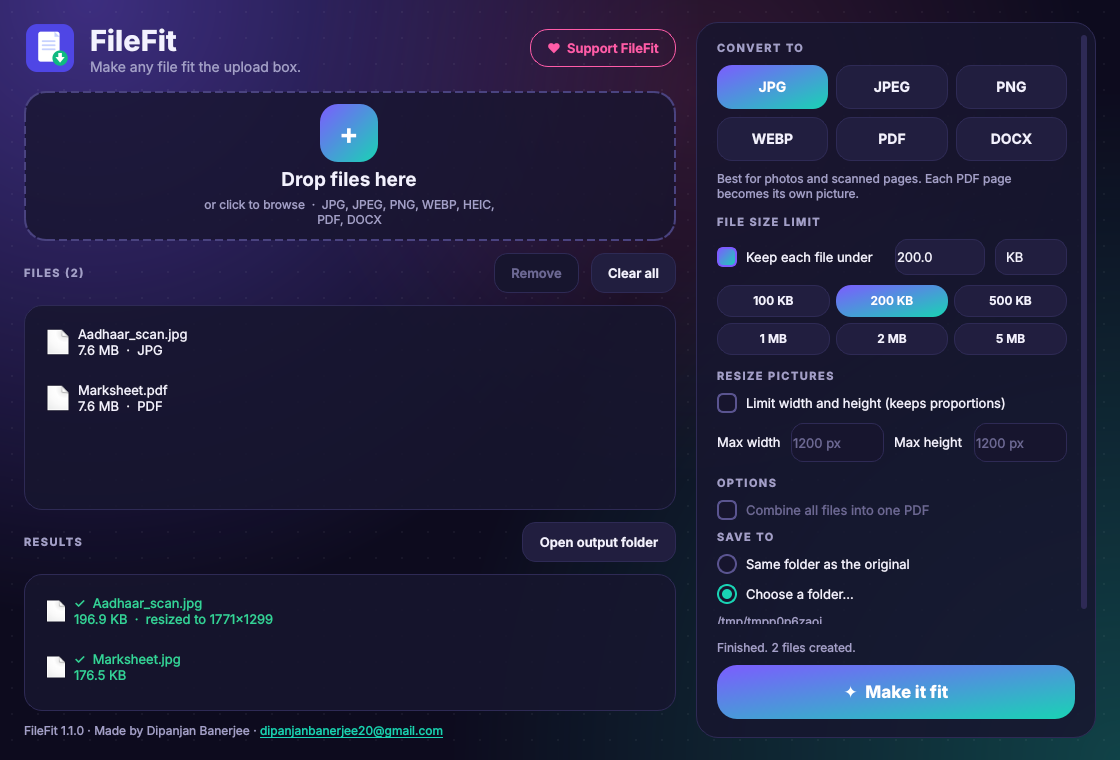
Portal wants a JPG under 200 KB and you have a 7 MB PDF? FileFit converts it and shrinks it to the limit in one click. Free, offline, and your files never leave your computer.
- JPG
- JPEG
- PNG
- WEBP
- HEIC
- DOCX
Download FileFit
Windows 10 and 11, 64-bit. If Windows shows "Windows protected your PC", click More info, then Run anyway.
Install with pipx (recommended)
pipx install filefitAdd it to your app menu
filefit-cli --install-shortcutAlso works with pip install filefit inside a virtual environment. Needs Python 3.10 or newer.
Android 7 or newer, 64-bit phones (almost every phone sold since 2017). After the download, tap the file and choose Install. If your phone asks, allow your browser to "install unknown apps" (this is normal for apps from outside the Play Store). Turning Word files into PDF needs the Windows version; everything else works on the phone, fully offline.
Rejected for size? Not any more.
The black line is the portal's 200 KB limit. Bars drawn to scale.
Everything an upload form asks for
Any format to any format
JPG, JPEG, PNG, WEBP, HEIC photos, PDF and Word files, converted in both directions.
Hit an exact size limit
Type 2 MB or 100 KB. FileFit keeps the best quality that fits and only shrinks the picture if it must.
Resize to set dimensions
Set a maximum width and height in pixels, for photo and signature uploads.
Merge into one PDF
Combine scans, photos and documents into a single PDF in the order you choose.
Works offline
Everything happens on your own device. Nothing is uploaded anywhere.
Originals stay safe
New files get a new name. Your original documents are never changed.
See it in action

Free, no ads, no tracking. Keep it that way.
If FileFit got your form accepted, a small tip through UPI helps a lot. Scan the code with GPay, PhonePe, Paytm or any UPI app.
UPI ID: dipanjanbanerjee@pnb
Pay with a UPI app (on your phone)